Know the next step of every move, from the first preview to go-live
Every preview link gets a migration checklist that walks you through the move in eight steps. DNSPeek ticks steps off as checks finish and always shows the one thing to do now.
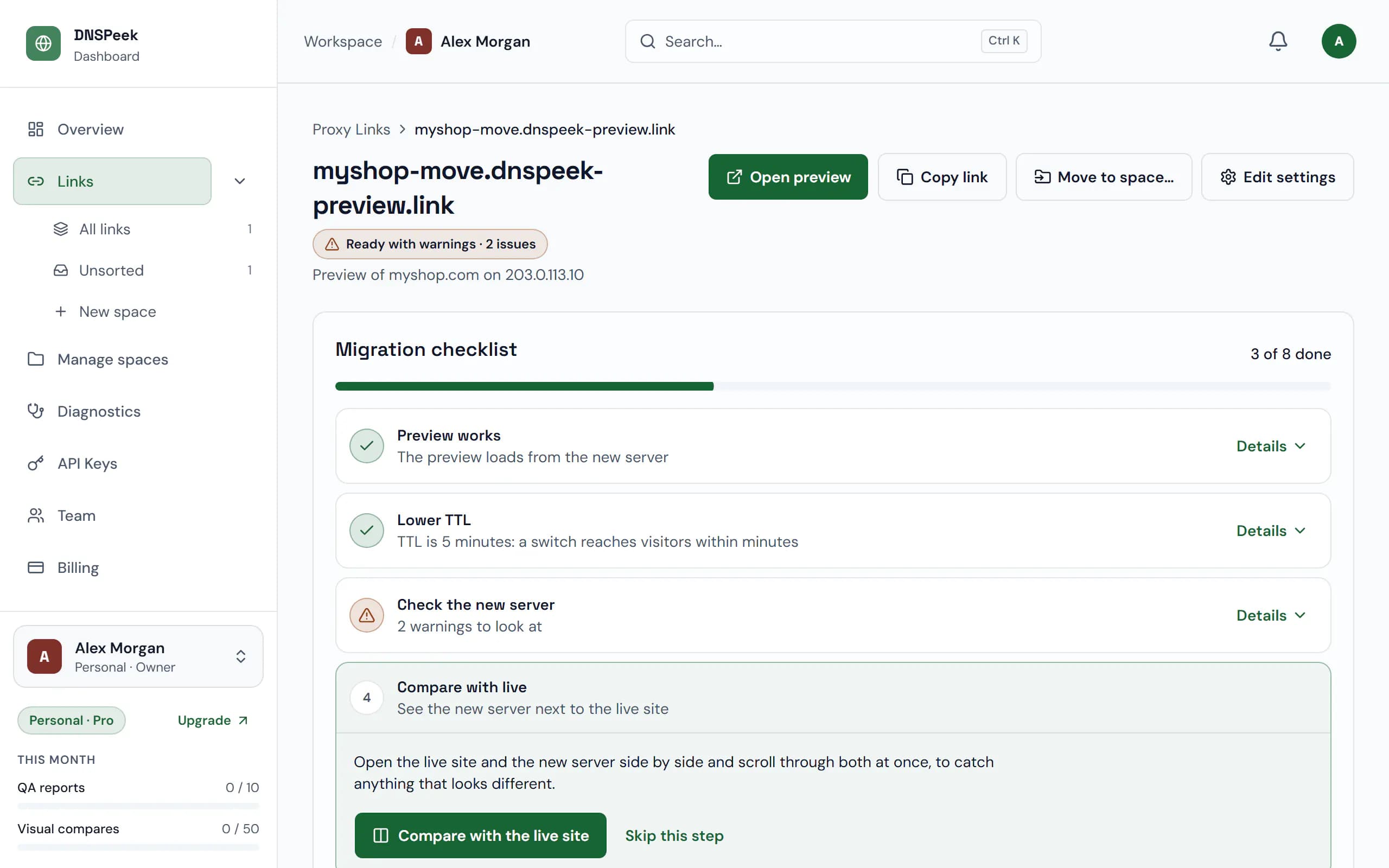
Sample data. Screenshot of the real product.
What you get
TTL without guesswork
DNSPeek reads the TTL from your domain’s nameserver, shows the change to make and counts down until the old value has expired, with a reminder when it is safe to switch.
DNS records you can copy
See what to change, what to keep for email and a plain verdict on whether email is safe, then copy it all as a zone snippet. DNSPeek never changes your DNS.
A switch you can watch
The switch screen shows resolvers around the world picking up the new server, one by one, with the highest TTL still cached.
Proof the move is done
Finish with a shareable Migration complete page: scores before and after, how long the switch took to spread and the client’s approval, without server IPs.
How it works
- 1
Create a preview link
The checklist appears on the link’s page and starts with the server check of the new server.
- 2
Lower the TTL and check the server
Follow the TTL countdown, run a QA report, compare with the live site and get your client’s sign-off if you need it.
- 3
Prepare the records and switch
Copy the records to change, update them at your DNS host and watch the switch screen fill up.
- 4
Verify and finish
DNSPeek checks the live site, gives you the certificate and reminds you a week later to retire the old host.
Plans
What each plan includes for this feature, from the current plan catalog.
QA reports / month
- Free
- 1
- Pro
- 10
- Agency
- 100
- Provider
- Unlimited
Live compare sessions / month
- Free
- 3
- Pro
- Unlimited
- Agency
- Unlimited
- Provider
- Unlimited
DNS propagation alerts
- Free
- Not included
- Pro
- Included
- Agency
- Included
- Provider
- Included
Comments & client approval
- Free
- Not included
- Pro
- Not included
- Agency
- Included
- Provider
- Included
Launch readiness reports
- Free
- Not included
- Pro
- Included
- Agency
- Included
- Provider
- Included
Questions, answered
Which plans have the checklist?
Every plan, on every link in your account. Some steps use plan features, such as the monthly QA reports, client comments or DNS alerts.
Can I skip steps?
Yes. Any step you don’t need can be skipped, and steps that depend on you, like client sign-off, have Mark as done.
Does DNSPeek change my DNS records?
No. It reads your public records and tells you what to change; you make the change at your DNS host.
What happens after the switch?
Verify & finish shows the automatic check of the live site, then you get a shareable Migration complete certificate. A week later DNSPeek reminds you to cancel the old hosting.
Check the new server before your visitors do
Free, no credit card, and no account needed for your first link.